Customer feedback classified and routed by an n8n workflow
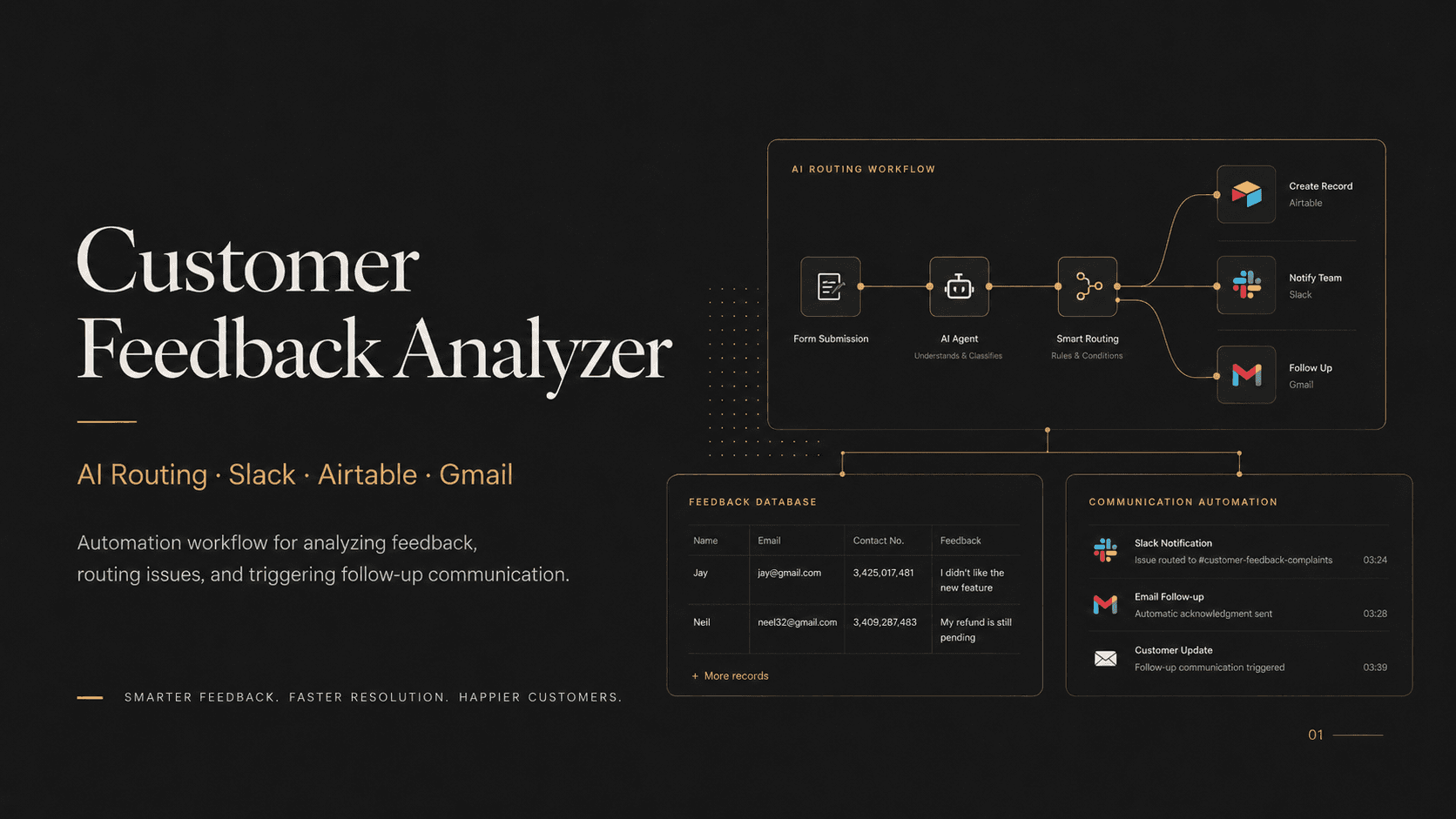
This automation reads incoming customer feedback, identifies the type of issue, stores a structured record and sends the right team a useful alert. It also supports a follow-up email path when the review needs a response.
In short
The Customer Feedback Analyzer is an automation that triages incoming customer reviews. It uses AI to classify intent and sentiment, stores a structured record in Airtable, sends a Slack alert to the responsible team with the original context, and supports Gmail follow-up emails. It replaces repetitive manual triage, and every processed review keeps a record the team can inspect later.
- Platform
- n8n
- Classification
- Intent and sentiment
- Integrations
- Slack, Airtable, Gmail
01 / The problem
Why the n8n customer feedback workflow was needed
Customer feedback arrives with different wording, urgency and ownership. Manual triage takes time, and useful reviews can remain in an inbox when the responsible team is not immediately clear.
A reliable automation needed to do more than label sentiment. It had to retain the original message, record the classification and route the result in a way the team could inspect.
02 / The build
How I approached the build
I built an n8n workflow that receives the review, prepares it for AI classification and records structured fields in Airtable. Routing rules then send a Slack alert to the appropriate team with the context needed to act.
Gmail steps support acknowledgement or follow-up messages, while the stored record keeps classification and communication visible for later review.
03 / Capabilities
What the n8n customer feedback workflow does
Review intake
The workflow accepts incoming feedback in a consistent automation entry point.
AI classification
Intent, sentiment and ownership signals are extracted from the review text.
Structured storage
Airtable retains the original review and the resulting classification.
Team routing
Slack alerts go to the team that can handle the identified issue.
Email follow-up
Gmail steps can acknowledge the customer or prepare the next response.
Visible workflow
Each n8n step can be inspected and adjusted as the review process changes.
04 / Workflow
How it works, step by step
- 01
Receive the review
The workflow captures the feedback and its source details.
- 02
Classify the message
AI extracts intent, sentiment, urgency and the likely owner.
- 03
Store and route
The review is saved and the relevant team receives an alert.
- 04
Follow up
The workflow can send or prepare an appropriate email response.
05 / Product screens
Product screens
Select a screen to inspect the interface, workflow and operational details more closely.
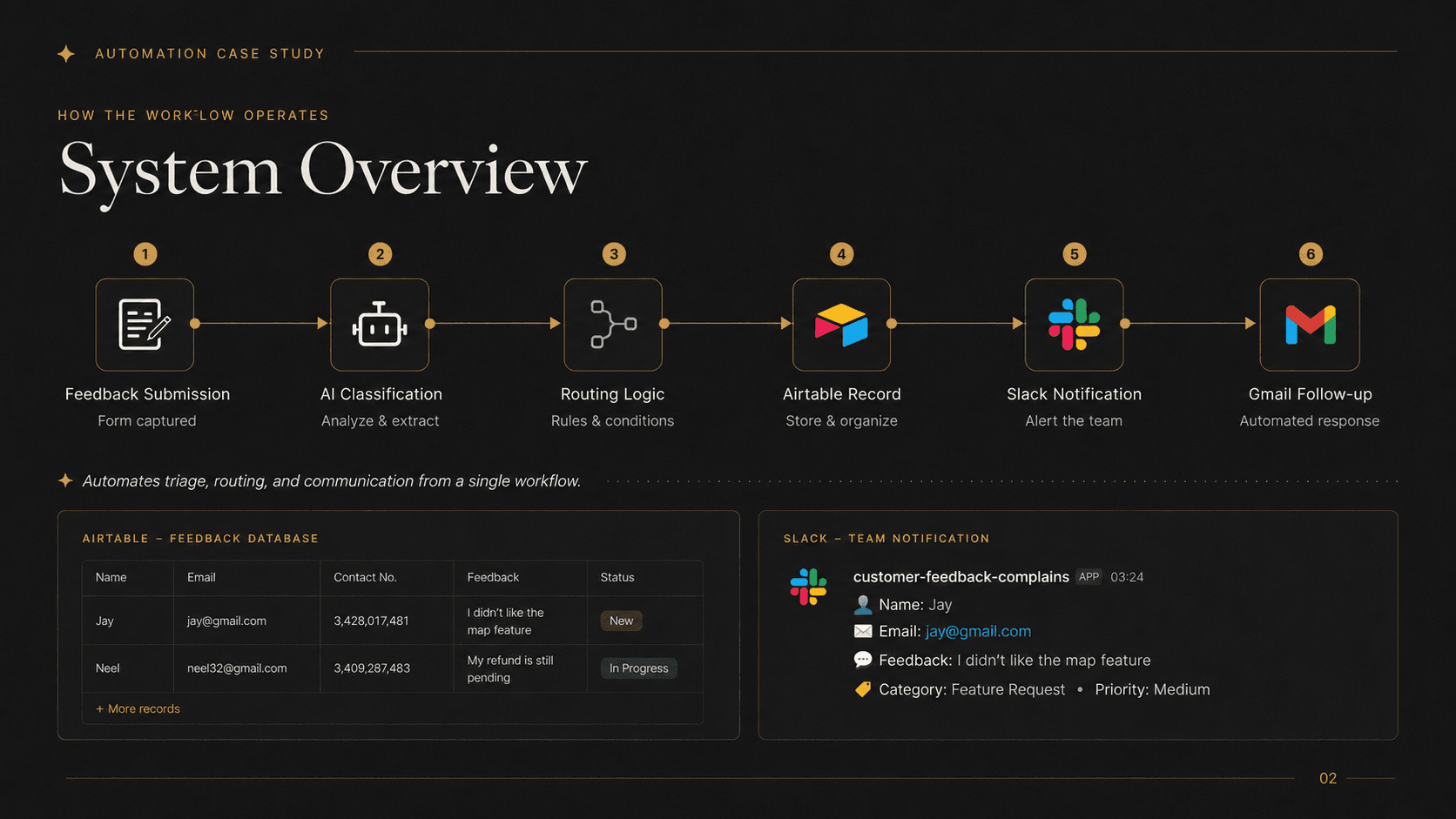
Customer Feedback Analyzer | n8n AI Routing & Team Alerts product view 1
06 / What changed
The practical result
- Every processed review keeps a structured record instead of disappearing after an alert.
- Team notifications include the classification and original customer context.
- The workflow can change as routing rules and feedback categories evolve.
Common questions
Questions about building a similar n8n customer feedback workflow
Yes. An n8n workflow can send review text to an AI model, validate the structured response and route the result through normal workflow steps.
Yes. Routing rules can select a channel or team based on classification, urgency, product area or another approved field.
A stored record supports auditing, trend analysis, reprocessing and later follow-up. A chat alert alone is easy to lose.
Yes. Low ratings or urgent classifications can notify a specific team, create a follow-up task or pause for human review.
Yes. An approval step can keep the drafted response in a review queue until an authorized user accepts or edits it.
Yes. Classification fields and routing rules can be updated as the business learns which feedback groups are most useful.
Work with me
Need an n8n automation developer?
I build workflows that connect AI classification with the tools your team already uses, without hiding the process behind a black box.
Discuss your projectKeep exploring
Related case studies
Ampere Support | RAG Chatbot with Live Human Handoff
A RAG customer support chatbot with an embeddable widget, WebSocket chat, answers grounded in company docs, automatic escalation and live agent handoff.
Read the RAG support chatbot case studyAutomationSEO Automation Platform | AI Content & Publishing
An SEO automation platform for research, AI-assisted content, translation, GitHub publishing and multi-site website generation.
Read the SEO content automation platform case studyEnterpriseSupport Space | 3PL Operations Platform
Support Space is a 3PL operations platform with connected workspaces for seller accounts, support, carrier investigations, credits and warehouse staff.
Read the 3PL operations platform case study