3PL email automation, from order issue to carrier reply
3PL Email Automation replaces an investigation process that depended on email threads, support tickets and manual status checks. Sellers can open a case from an order, upload evidence and follow progress without contacting the operations team for every update.
In short
3PL Email Automation gives sellers and operations staff one workflow for carrier investigations. Sellers open a case from a shipped order, upload evidence and follow status updates. Backend automations link carrier email replies, Google Drive files and Freshdesk tickets to the right case, so the investigation record becomes the shared source of context and the portal reduces repetitive status communication.
- Users
- Sellers and operations staff
- Integrations
- ChannelDock, Gmail, Google Drive, Freshdesk
- Case data
- Firestore
- Core stack
- Python, Node.js, Firebase
Product demo
Watch the 53-second demo
A 53-second walkthrough of the 3PL Email Automation system: a seller raises a claim for a lost or damaged parcel in the client portal, the carrier is contacted by email or through its website automatically, AI reads every reply and the seller's thread updates on its own.
› Read the transcript
Every lost parcel used to mean ten emails. Now it takes one click. For a fulfilment centre, a damaged or missing parcel meant emails with the client, emails with the carrier, and days of forwarding in between. So we gave every client their own web portal. They log in and see all their shipped orders live from the warehouse system. If something's wrong with an order, they just click "Raise query", pick the carrier and the reason, attach the evidence, and submit. From there, it runs itself. The claim goes straight to the right carrier, by email or through the carrier's own website, with every file attached. Carrier replies land in the client's thread automatically. AI reads each one, so the case moves on without anyone forwarding a thing. No email chains, no copy and paste. The whole claim, from start to finish, runs on its own.
01 / The problem
Why the 3PL email automation was needed
Carrier investigations produce long conversations, attachments and status changes. When that information is split between a seller portal, Gmail, Freshdesk and the carrier system, the team spends time copying updates and checking which record is current.
The system also needed to give sellers useful visibility without exposing internal controls or requiring operations staff to maintain the same case in several places.
02 / The build
How I approached the build
I developed a structured investigation workflow around shipped orders. A seller selects the relevant shipment, explains the issue, uploads evidence and receives a case record with a visible status history.
Backend automations connect ChannelDock, Gmail, Google Drive and Freshdesk. Incoming carrier replies are associated with the right investigation, attachments remain available, and seller-facing updates stay synchronized with the internal case.
03 / Capabilities
What the 3PL email automation does
Order-based case creation
Sellers start from a known shipment, which reduces missing references and manual lookup.
Evidence handling
Files and supporting details remain attached to the correct investigation.
Carrier email synchronization
Replies can update the case instead of remaining isolated in a mailbox.
Freshdesk workflow
Browser automation connects case activity with the existing support process.
Seller status tracking
Customers can see progress without asking the team to repeat an update.
Internal case controls
Operators retain ownership of decisions and sensitive workflow actions.
04 / Workflow
How it works, step by step
- 01
Select a shipment
The seller chooses the affected order and starts an investigation.
- 02
Collect evidence
The portal records the issue, attachments and required carrier context.
- 03
Synchronize communication
Email and support replies are linked back to the active case.
- 04
Show the current status
Seller and operator views reflect the same investigation lifecycle.
05 / Product screens
Product screens
Select a screen to inspect the interface, workflow and operational details more closely.
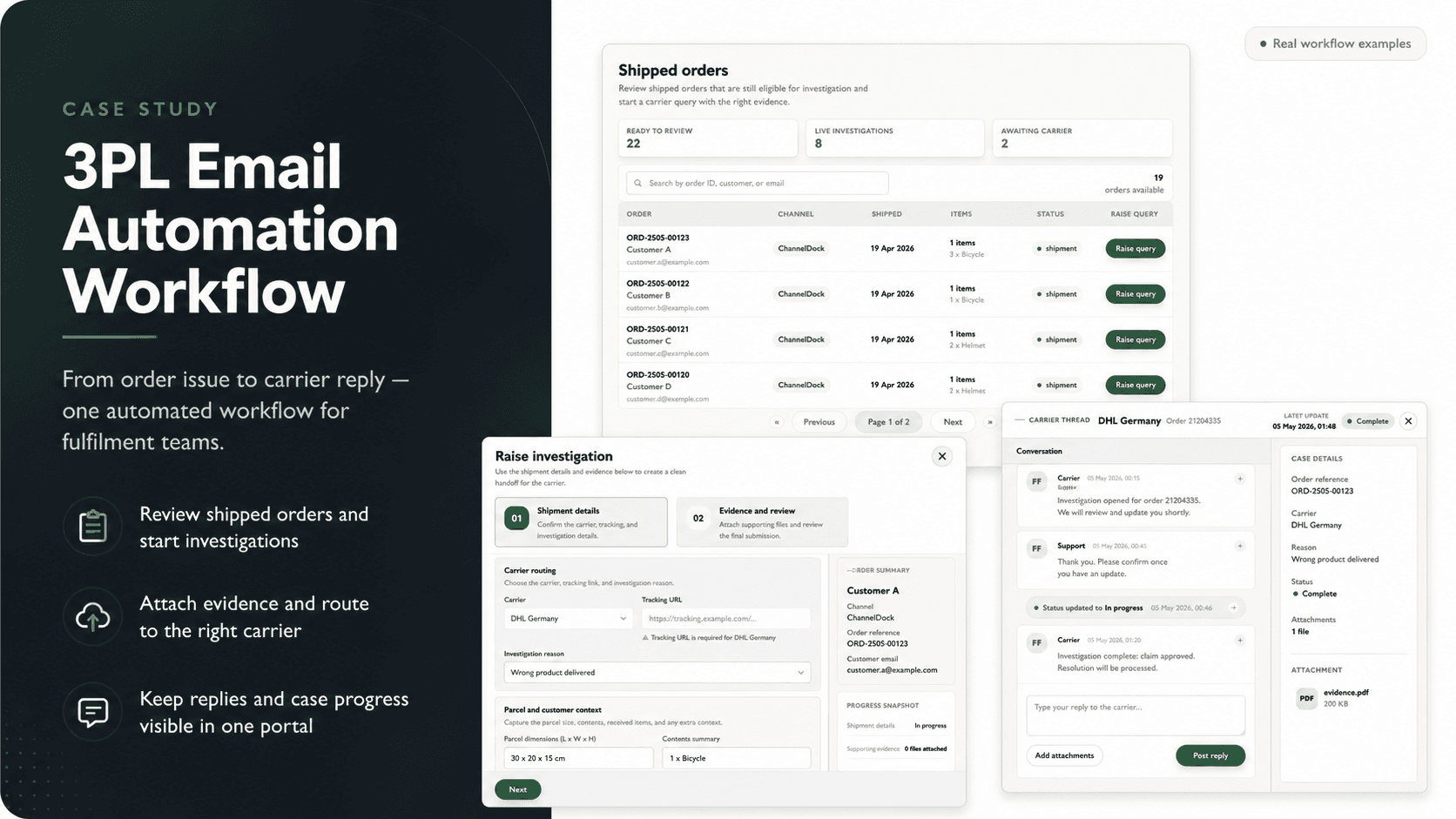
3PL Email Automation | Carrier Investigations & Seller Portal product view 1
06 / What changed
The practical result
- The investigation record becomes the shared source of context for sellers and the operations team.
- Carrier replies and evidence are easier to trace because they stay connected to the original shipment.
- The portal reduces repetitive status communication while preserving internal control of the process.
Common questions
Questions about building a similar 3PL email automation
It connects order records, seller requests, carrier communication, evidence and support tickets so an investigation can move through one controlled workflow.
Yes. Replies can be parsed and associated with the correct case when the workflow has reliable order, seller and carrier references.
Yes. The application can integrate with the current support platform instead of forcing the team to replace every tool at once.
Evidence files are attached to the investigation record so operators can review the shipment, communication and supporting material in the same context.
No. Seller-facing status and internal operational notes use separate views so the team can communicate progress without exposing private handling details.
The message moves to an exception path where an operator can associate it with the correct shipment or investigation before processing continues.
Work with me
Planning a 3PL automation system?
I can help turn seller requests, carrier communication and internal case handling into one reliable workflow.
Discuss your projectKeep exploring
Related case studies
Carrier Portal Bot | Claims & Ticket Automation
A browser automation bot that opens, tracks and closes parcel claim tickets in a carrier partner's portal that has no API, for a Dutch 3PL.
Read the carrier portal automation bot case studyEnterpriseSupport Space | 3PL Operations Platform
Support Space is a 3PL operations platform with connected workspaces for seller accounts, support, carrier investigations, credits and warehouse staff.
Read the 3PL operations platform case studyEnterpriseAI Returns Scanner | Label Reading & Returns Intake
An AI returns scanner for a Dutch 3PL. Workers photograph the label, Gemini reads it, and the return is matched and booked in ChannelDock.
Read the AI returns scanner case study