New-hire scans turned into a checked, filled payroll sheet
This system reads new-hire paperwork and fills a company's existing payroll template. HR drops in candidate folders. The pipeline classifies each page, extracts the fields, compares them across documents and only asks a person when the documents disagree.
In short
I built an AI document processing system that turns candidate onboarding folders into a completed payroll spreadsheet. A vision model reads every page, the same field is compared across documents, and only real conflicts reach a person. In the run shown, 98% of fields across 54 payroll columns were filled without manual input, and the setup costs nothing between intakes.
- Fields auto-filled
- 98%
- Payroll columns
- 54 per person
- Staff time saved
- ~12 hrs per intake
- Infrastructure saving
- ~$2.7k a year
01 / The problem
Why the AI document processing system was needed
HR was typing new-hire details in by hand. Each candidate came with around six scanned documents. Staff estimated 15 to 20 minutes per person to read them, key in the fields and settle the ones that appeared on more than one document. An intake of 40 candidates meant about 12 hours of data entry.
The paperwork was messy. Files arrived as separate scans, merged PDFs or phone photos, and names were often unhelpful. Some folders used a payroll number instead of the expected employee code. Any automation had to handle that without hiding its own guesses.
Hiring also comes in bursts. A busy intake week is followed by quiet weeks, so a server running all year would mostly be paid to sit idle.
02 / The build
How I approached the build
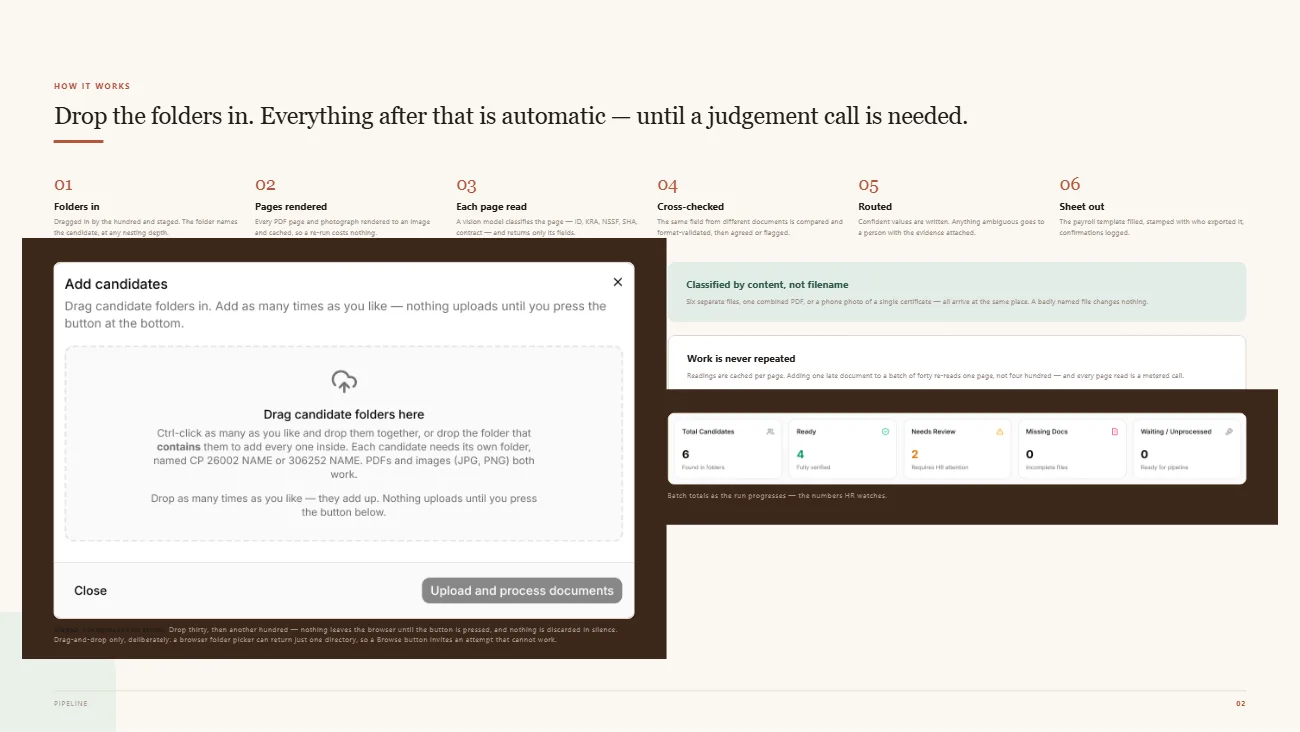
Intake is drag-and-drop only. A browser folder picker can return a single directory, so a Browse button would invite uploads that could never work. Every PDF page and photo is rendered to an image and cached. Each page is classified by what it shows, not by its filename, and a vision model returns only the fields that page type should hold. Page reads are metered, so adding one late document re-reads one page, and an interrupted run picks up where it stopped.
Cross-validation decides what gets written. If enough independent documents agree and the value passes that field's format rule, it goes into the sheet. A single outlier against a clear majority is outvoted but kept as a note on the field. With no majority, the system shows its best guess and every reading, then waits for a person. Every value links to its source document and page, so a reviewer can open the scan in one click.
Extraction runs as a background job rather than inside a web request, so a long batch cannot time out, and nothing runs between intakes. Concurrency is capped at eight candidates at a time. Each team member works in a workspace isolated at the storage layer. The audit log records who confirmed which field but never the value, and it sits outside every workspace so deleting an account cannot erase it.
03 / Capabilities
What the AI document processing system does
Bulk folder intake
HR drops in candidate folders by the dozen or the hundred, at any nesting depth, and nothing uploads until they confirm.
Content-based classification
Each page is identified as an ID, tax certificate, contract or form from its content, so file names do not matter.
Cached, resumable runs
Page readings are stored once, so reruns and late documents only pay for new pages.
Majority cross-validation
Values are written only when independent documents agree and the format check passes.
Source page on every field
Each value names the document and page it came from, with a link to the rendered scan.
Assumed values flagged
Codes taken from a folder name instead of a document are kept as written but marked amber on every screen.
Audit trail without the data
The log shows who confirmed which field and when, without storing ID numbers or other values.
Payroll template export
Confirmed values fill the client's existing payroll spreadsheet, so downstream payroll steps stay the same.
04 / Workflow
How it works, step by step
- 01
Drop in the folders
HR drags candidate folders into the intake dialog and starts the run.
- 02
Render and read each page
Pages are rendered, cached, classified and read by a vision model.
- 03
Cross-check and route
Fields are compared across documents. Conflicts go to a reviewer with every reading attached.
- 04
Export the payroll sheet
Confirmed values fill the payroll template and each confirmation is logged.
05 / Product screens
Product screens
Select a screen to inspect the interface, workflow and operational details more closely.
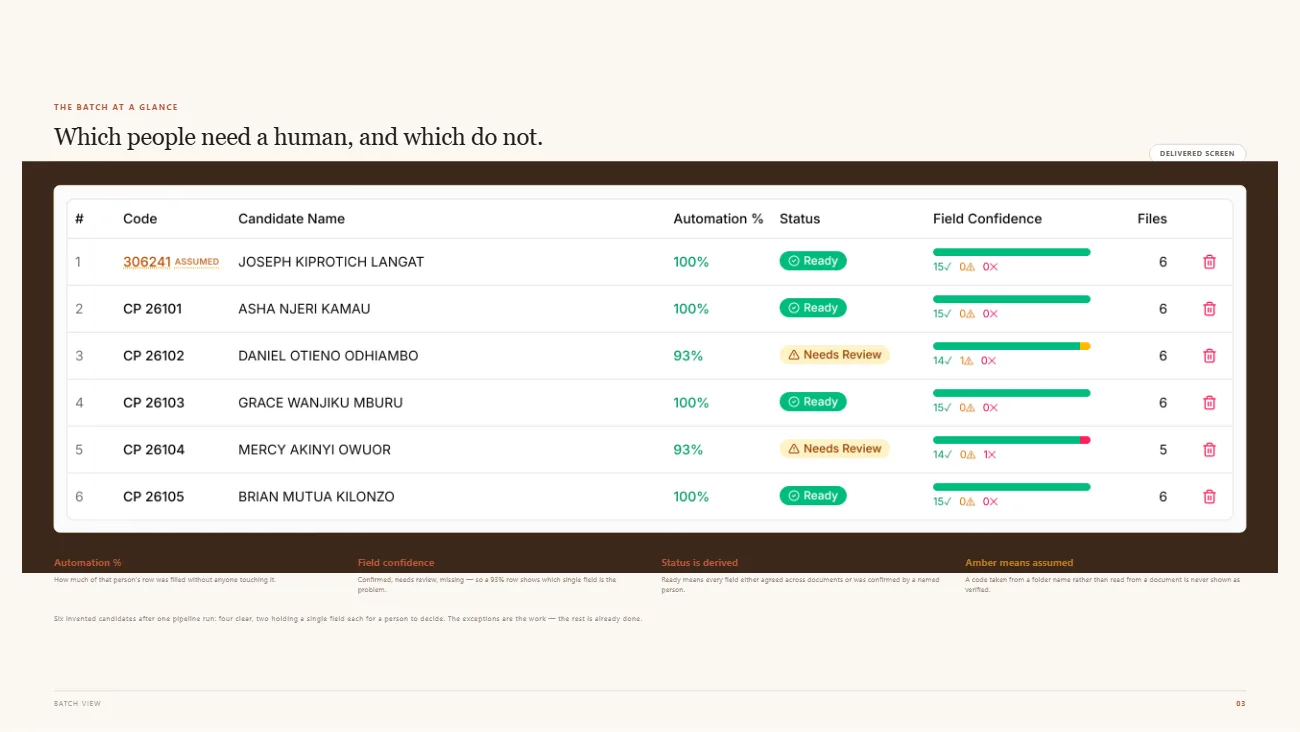
Batch review
06 / What changed
The practical result
- 98% of fields in the run shown were filled with no manual input, across 54 payroll columns per person.
- About 12 hours of manual capture removed per 40-candidate intake, based on HR's own estimate of 15 to 20 minutes per person.
- Around $2,700 a year in infrastructure avoided. Each batch used 3.9 processor-hours in the measured month, against 730 billed hours for an always-on server.
Common questions
Questions about building a similar AI document processing system
Yes, a vision model can read scanned IDs, tax certificates, contracts and personal forms page by page. In this system each page is classified by its content first, then only the fields expected for that document type are extracted. Phone photos work too, with rotation corrected and size capped before reading. Values are compared across documents before anything is written.
The system never picks one silently. If a clear majority of documents agree and the value passes its format check, it is written, and any single dissenting reading is recorded on the field. If there is no majority, such as two documents against two, the field waits for a person who can see every reading and open each source page.
The system accepts them but marks any guess clearly. Folders named by payroll number instead of the expected employee code are kept as written and flagged amber on every screen, because inventing a prefix would put a wrong code into payroll. A bare number also needs at least five digits, so a subfolder called 2024 is not treated as a person.
Yes, the export fills the client's own payroll template instead of introducing a new format. In this project that meant 54 columns per person, including values derived from the documents, such as surname and first names split from a full name. HR keeps working with the same file their payroll process already expects, with confirmations stamped on the export.
Cost follows usage rather than the calendar. Nothing runs between intakes, extraction runs as a background job on cheaper billing, and each page reading is cached so reruns never pay twice. In the measured month, each batch used 3.9 processor-hours against the 730 hours an always-on server would bill, which avoids about $2,700 a year.
The audit trail records that a named person confirmed a named field, but it never stores the value. That keeps the log from becoming a second copy of ID numbers. It sits outside every workspace, so deleting an account cannot erase it, and each team member can only see their own candidates, enforced in the storage layer rather than by endpoint checks.
Work with me
Need to automate document-heavy onboarding or data entry?
I build AI document pipelines that read real-world scans, check their own work and fill the spreadsheets your team already uses.
Discuss your projectKeep exploring
Related case studies
TerraScope AI | Property Feasibility Platform
A property feasibility platform that extracts zoning rules from PDFs with human review, scores design concepts and produces deterministic cost estimates.
Read the AI property feasibility platform case studyAutomationn8n Customer Review Analyzer | AI Routing & Team Alerts
An n8n customer review automation that classifies feedback, stores records, routes team alerts and supports email follow-up.
Read the n8n review automation workflow case studyEnterpriseOpsDesk AI | Fulfilment Operations Platform
A 3PL logistics automation case study covering seller operations, support, order investigations, credits, analytics and warehouse workflows.
Read the 3PL fulfilment operations platform case study