The image pipeline behind an AI virtual try-on platform
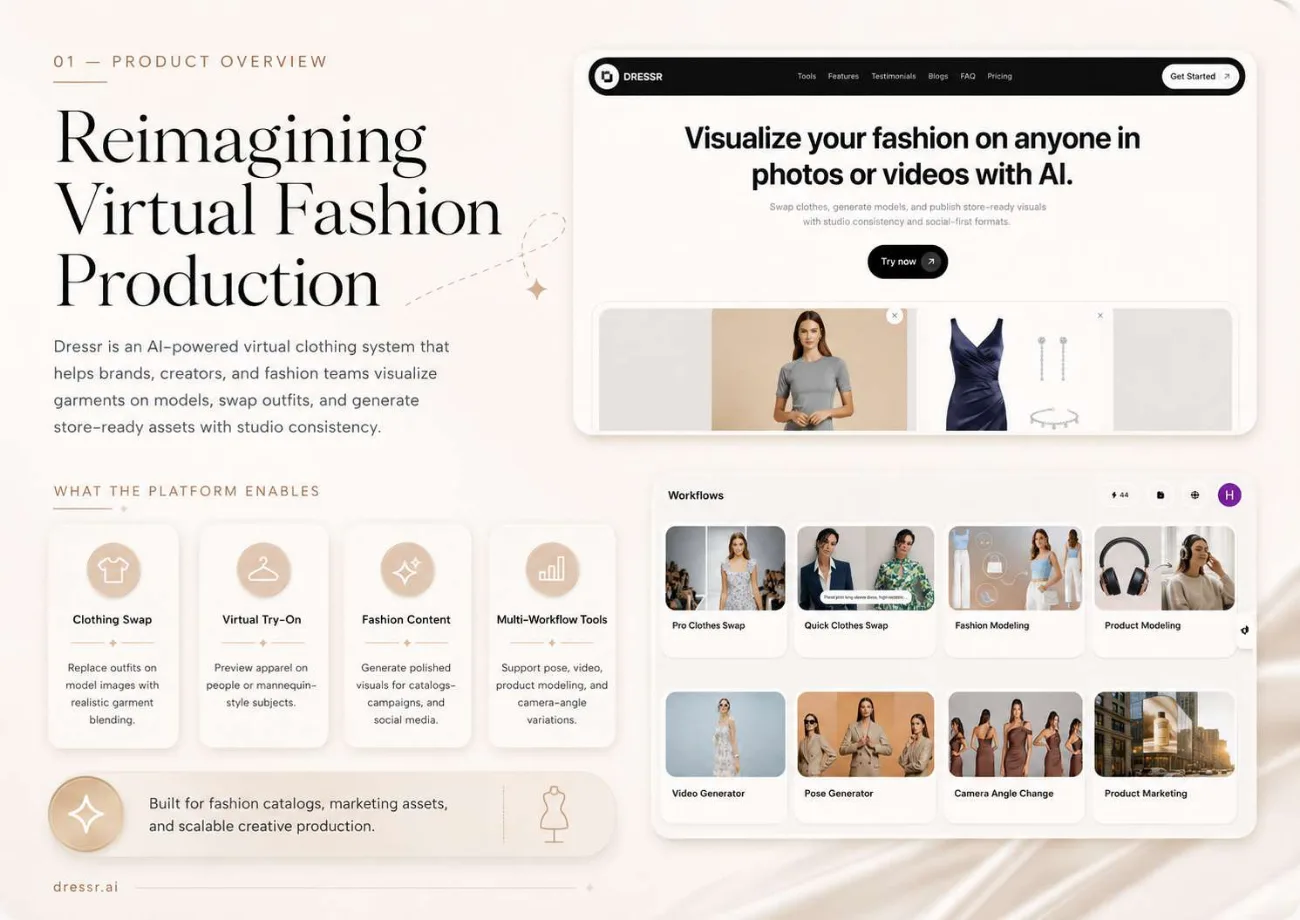
Dressr lets fashion brands and creators put a garment on a model, then turn the result into catalogue, product page and campaign assets. I built the visual pipeline and backend automation that make those workflows run, from preprocessing to batch output.
In short
Dressr is an AI virtual try-on platform for fashion brands, and I built its image pipeline and backend automation. A model image and a garment image become a realistic swap, scoped to full wear, top and bottom, or front and back, at up to 4K. Python services run ComfyUI and SDXL workflows with pose estimation, masking, job queues and retries.
- Workflows
- 8
- Swap modes
- Full, top-bottom, front-back
- Max resolution
- 4K
- Stack
- Python, ComfyUI, SDXL
01 / The problem
Why the AI virtual try-on platform was needed
Fashion visuals normally need a photo shoot, or a designer styling and retouching every variation by hand. Neither approach scales to a full catalogue.
Both also drift over time. The garment on the product page stops matching the one in the campaign, and a set of images no longer reads as one catalogue. The platform needed AI output that stayed consistent across garments, models and formats, and a backend that could run it in batches.
02 / The build
How I approached the build
I wrote Python services that coordinate preprocessing, inference and post-processing. Image generation runs through ComfyUI workflows using SDXL-style generation and inpainting. Pose estimation and mask generation guide where the garment sits, so fit, drape and proportions follow the model's body.
The swap can be limited to the full outfit, the top and bottom, or the front and back, at a quick or pro quality tier up to 4K. A finished result can be edited, re-posed, shown from a new camera angle, upscaled or turned into video without running the full swap again.
Job queues, retries and logging handle batch runs, so a merchandising team can process many looks at once and plan around the output.
03 / Capabilities
What the AI virtual try-on platform does
Scoped garment swap
Swap a full outfit, a top and bottom set, or front and back, from a model image and a garment image.
Quick and pro tiers
Choose speed or quality per swap, with output up to 4K.
Pose-aware fitting
Pose estimation and masks guide garment placement and alignment on the body.
Post-generation variation
Edit, re-pose, change camera angle, upscale or make a video from an existing result.
Model and product modelling
Style apparel on generated models or show accessories on ready-made figures.
Store and campaign formats
The same asset is produced for product pages, catalogues and social campaigns.
Batch processing
Queues, retries and logging keep large jobs running without manual babysitting.
04 / Workflow
How it works, step by step
- 01
Add the model
Upload a subject image or generate a clean model base.
- 02
Add the garment
Provide a full outfit, a top and bottom set, or another apparel image.
- 03
Swap and align
The pipeline fits the garment to the model's shape, pose and proportions.
- 04
Refine and export
Edit, upscale, change pose or angle, then download the finished asset.
05 / Product screens
Product screens
Select a screen to inspect the interface, workflow and operational details more closely.
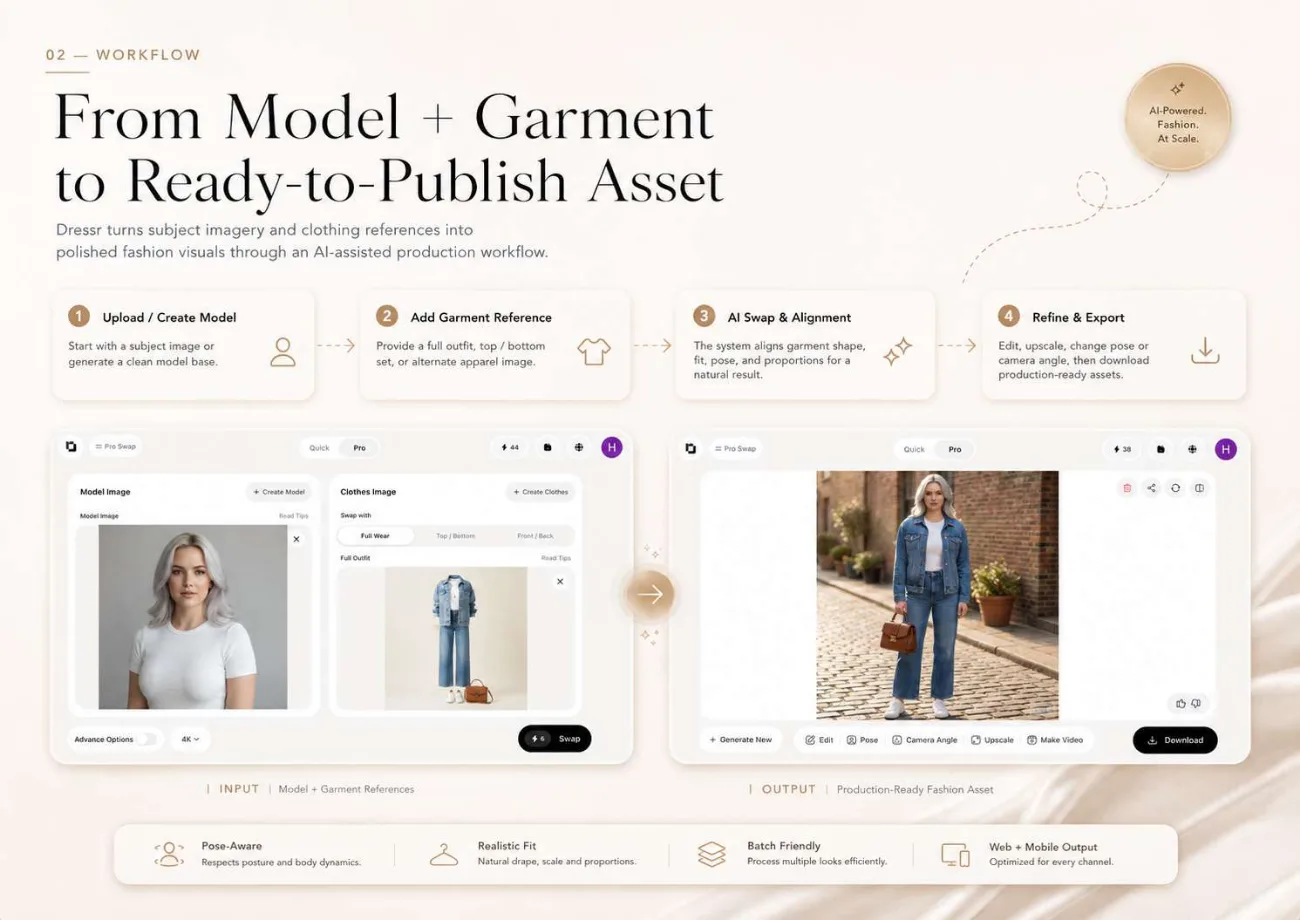
Model and garment workflow
06 / What changed
The practical result
- 8 fashion workflows run from a single garment, from clothes swap to product marketing.
- Swaps can be scoped 3 ways and rendered at quick or pro quality, up to 4K.
- Batch jobs run through queues with retries and logging, moving asset production from manual styling to repeatable output.
Common questions
Questions about building a similar AI virtual try-on platform
It combines a photo of a person with a photo of a garment and generates an image of that person wearing it. In Dressr, pose estimation and mask generation work out where the garment should sit, then an SDXL-style inpainting workflow in ComfyUI renders the fit, drape and proportions so the result looks like a real photo.
Yes. Each swap can be scoped to the full outfit, the top and bottom, or the front and back. That control is what makes the tool practical for a real catalogue, where you often need to change one item while keeping the rest of the look, rather than replacing everything every time.
Dressr produces swaps at up to 4K. Users choose a quick tier for fast styling results or a pro tier for higher quality and more control over clothes, pose, background and camera angle. A finished image can also be upscaled later, without running the whole swap again.
Yes. The platform has eight workflows built around one asset: pro and quick clothes swap, fashion modelling, product modelling, video generation, pose generation, camera angle change and product marketing. A single garment can become catalogue shots, product page images, campaign visuals and short videos inside the same system.
Consistency is treated as a product requirement, not a bonus. The pipeline aims for photoreal, studio-style output and keeps garments coherent across different models and variations. Post-generation tools change pose or angle from the existing result instead of regenerating from scratch, which helps the same item look the same everywhere.
Yes. Python services manage job queues, retries and logging, so many looks can be processed in one run without someone watching each image. That turns a per-image tool into something a merchandising team can schedule around, which matters when a new collection needs hundreds of product and campaign assets.
Work with me
Building an AI image or virtual try-on product?
I build generation pipelines and backend automation that turn diffusion workflows into reliable, batch-ready product features.
Discuss your projectKeep exploring
Related case studies
Imagen | AI Media Generation Platform
An AI media generation platform for image, video, prompt and document workflows with async jobs and realtime updates.
Read the AI media generation platform case studyAutomationAutogeniX | Multi-Agent Website Generator
A multi-agent Python system that plans, designs, builds, checks and deploys full websites. It has produced 50+ sites, each with its own brand identity.
Read the automated website generation system case studyWebPropTrader AVM | AI Property Intelligence Platform
An AI property valuation platform with automated valuation, portfolio tracking, market context, scenario simulation and appraisal reports.
Read the AI property valuation platform case study